
Labs often keep plate metadata in a spreadsheet. Instead of editing plates one at a time, attach the CSV in the Assistant and it reads the file, matches the rows to your plates, and shows a preview of the plates and cultures it would change. After one approval it writes the custom metadata to every active culture on the matching plates, or to just the wells listed in a well column.
Plates in the sheet that are not in your organization are skipped and reported back, so a sheet that lists plates that were never in Monomer still imports the rest. A malformed file or conflicting rows write nothing. CSV files are supported today.
The plate page's Culture Status overlay now shows one collapsible graph for each organoid metric (if available): area, diameter, circularity and anisometry. Each well is a line, and hovering a well on the plate highlights its line. Each value is the mean across the well's segmented objects, and captures without an analysis appear as gaps on the timeline. Plates without confluence data show the metric graphs in place of the empty confluence message.
Metric graphs and the Confluence overlay graph have a download menu. PNG saves the graph with a title, legend and any fixed Y range, at the same plot size every time so graphs from different plates line up side by side. CSV saves exactly the values that are plotted. Selected wells keep the same colors across metrics, and the Confluence graph now highlights the wells you've selected on the plate.
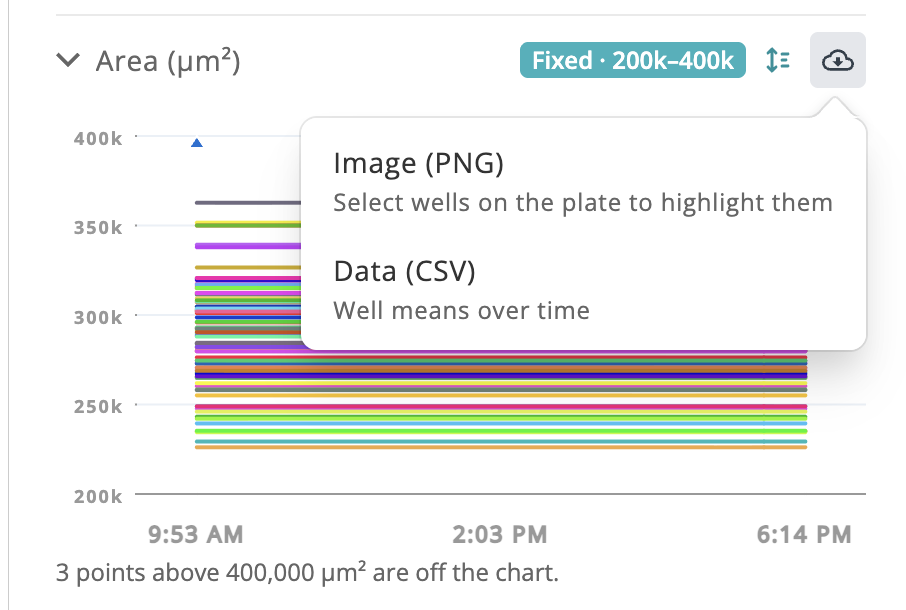
Each metric graph on the plate and well pages has a range control that switches the Y axis between Auto and Fixed, with an optional minimum and maximum. Points outside a fixed range are marked with a triangle at the edge, and the graph says how many are off the chart. Your ranges are remembered in your browser and carry across plates and wells until you change them. One range applies per metric on both pages, so a range tuned for plate averages may clip more on well pages.
Z-stack images whose layers start at Z0 now open on that first layer, and you can select it like any other.
Press Esc to leave a text field without losing what you typed, then press it again to move up a level, from a well to its plate or from a plate back to Cultures, Dashboard or Search.
Sites with fast internet links can now run up to 64 parallel dataset file uploads, four times the previous limit of 16, while uploads held to a bandwidth cap use far less CPU.
See who started each classification run at a glance in the classification queue.
Graphs now show captures without an analysis as gaps and draw wells with a single reading as a dot.
